OneDrive is a cloud-based platform and a spot to save your files to be easily accessed on any device from anywhere! You already have access to OneDrive with 1TB of storage, all you need to do is login.
Here’s how to get started:
- Go to:
www.office.com
- Sign in using your college e-mail address, and your password
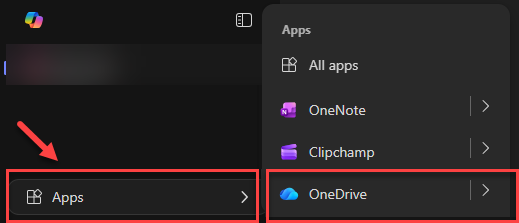
On the left navigation menu, select the Apps button, then select OneDrive.
You can start by creating one folder and then moving your H Drive files into it.
Pro Tip: You can drag and drop your files into the new OneDrive folder.
OneDrive Quick Start Guide
Video:
Get Started with OneDrive at work